Authentication vs Authorisation: What Business Software Teams Need to Get Right

Content authorBy Lincoln WoolseyPublished onReading time14 min read
A modern tech startup office with a premium desk split into two zones, featuring a biometric login laptop and an access management dashboard.

Authentication and authorisation solve different problems: verifying who a user is and deciding what they can access. Understanding the difference helps you assess the cost and risk of getting either one wrong.

Authentication vs authorisation basics

A customer's operations manager logs into your platform on Monday morning and sees invoice data belonging to a different customer. The login worked perfectly. That's the trap in authentication vs authorisation, because the system verified who she was and then assumed that answered what she could see.

Authentication answers one question: is this person who they claim to be? Authorisation answers a second, separate question: given that we know who they are, what are they permitted to do right now? Broken access control ranks first in the OWASP Top 10 because it appears in 94% of tested applications, which tells you which of the two questions software teams answer badly.

Treating a successful login as proof of permission is the single most expensive assumption in B2B software design. The two layers of authentication vs authorisation work together, but they fail independently, and they need separate requirements.

Authentication vs authorisation matrix

The authentication vs authorisation distinction gets slippery in meetings because both words start with "auth" and both get delegated to the same engineer. A side-by-side comparison keeps the conversation honest when you're writing requirements rather than code.

AuthenticationAuthorisation
PurposeEstablish identityDecide what that identity can do
TimingOnce at sign-in, plus step-up for sensitive actionsOn every request that touches data or triggers an action
InputsCredentials, second factors, device signalsRoles, claims, tenant, resource ownership, policy
OutputA verified session or tokenAn allow or deny decision
Typical controlMulti-factor authentication (MFA), single sign-on (SSO)Least-privilege defaults, server-side permission checks
Failure modeAccount takeover, credential stuffingCross-tenant data exposure, privilege escalation
Audit evidenceLogin logs, failed attempts, factor usedPermission grants, denials, privileged action records

Concrete version. A finance user at your customer authenticates with a password and a passkey, which proves she is Sarah Okonjo. Authorisation then decides she can approve invoices under £10,000 for her own company only, and it makes that decision again on every single click.

The authentication layer

Before anyone chooses a vendor, four decisions about authentication vs authorisation belong to the business rather than the build team. How certain do you need to be about who someone is? How do new users get an account in the first place, and who approves it?

The third decision is account recovery, which is where most authentication designs quietly collapse. A support process that resets a password after two security questions undoes whatever you spent on MFA. The fourth is usability, because an authentication flow your customers' staff refuse to use gets bypassed through shared logins.

NIST separates these concerns into identity assurance and authentication assurance, which is a useful split for procurement. One is about the strength of the enrolment check, and the other is about the strength of the login check. Specify both, because they're rarely the same for the same user.

Identity proofing

Identity proofing in authentication vs authorisation happens once, when an account is created, and it asks whether this person exists and is who they say they are. Login checks happen thousands of times afterwards and only ask whether the person at the keyboard holds the credential bound to that account. Weak proofing means every subsequent login is a well-secured door to a fraudulent account.

The three levels in the NIST framework map to business decisions cleanly enough. IAL1 accepts self-asserted information. IAL2 requires documentary evidence, and IAL3 involves in-person verification by a trained representative. Most B2B platforms sit at the first level for ordinary customer users and should sit higher for anyone touching money or personal data.

Stronger proofing earns its cost in three places. Employees with access to production customer data justify a documented enrolment check. Customer users who hold financial approval rights and administrators who can act across tenant boundaries also justify a documented enrolment check. Everyone else can be vouched for by an existing verified administrator in their own organisation, which pushes the proofing burden to the party with the best knowledge.

Ready to bring your ideas to life?

Book a free 30-minute discovery call with our team — we'll understand your objectives and advise how bespoke software, MVP development, or an extended team can help your business.

Passwordless login and MFA

Passwords remain the default because they cost nothing to implement and everyone understands them. They're also the reason 31% of breaches over ten years involved stolen credentials, according to Verizon's 2024 Data Breach Investigations Report. The UK's National Cyber Security Centre now advises system owners to reduce reliance on passwords through SSO and hardware tokens rather than demanding more complexity from users.

Not all second factors are equal, and the gap matters when you're choosing. Google's own research found that on-device prompts blocked 90% of targeted attacks while hardware security keys blocked all of them, because a phishing site can relay a one-time code but can't relay a cryptographic challenge bound to your domain. That's the practical meaning of phishing resistance.

Four decisions worth making explicitly before you brief a development team:

  • Which actions trigger a step-up challenge, rather than challenging on every login and training users to click through

  • What the recovery path looks like when someone loses their phone, and who approves it

  • Whether privileged administrators are required to use phishing-resistant factors, with no fallback to codes

  • How you handle customers whose IT policy blocks the factor you prefer

The NCSC's guidance on choosing authentication methods makes the same point about friction. Requiring a second factor on every interaction irritates users until they find a way around it, so reserve it for high-impact activity and unusual sign-in patterns.

SSO and sessions

SSO lets a customer's employees authenticate through their own corporate identity provider instead of holding a separate password in your product. Your customers' security teams will ask for it, and it removes an entire class of offboarding failure because disabling someone in the corporate directory disables them in your platform.

What SSO creates is a session, and sessions are where authentication vs authorisation meets the real world. You need a defined expiry and a way to revoke a session immediately when someone is removed. The Okta support system breach in 2023 showed why: attackers used stolen session tokens to hijack sessions at 5 customers without ever knowing a password.

The protocol argument matters far less than teams assume. Whether identity arrives by SAML or OpenID Connect, the assertion carries who the user is and a handful of attributes about them. The access model and the permission decisions of identity and access management still have to live in your application.

The authorisation layer

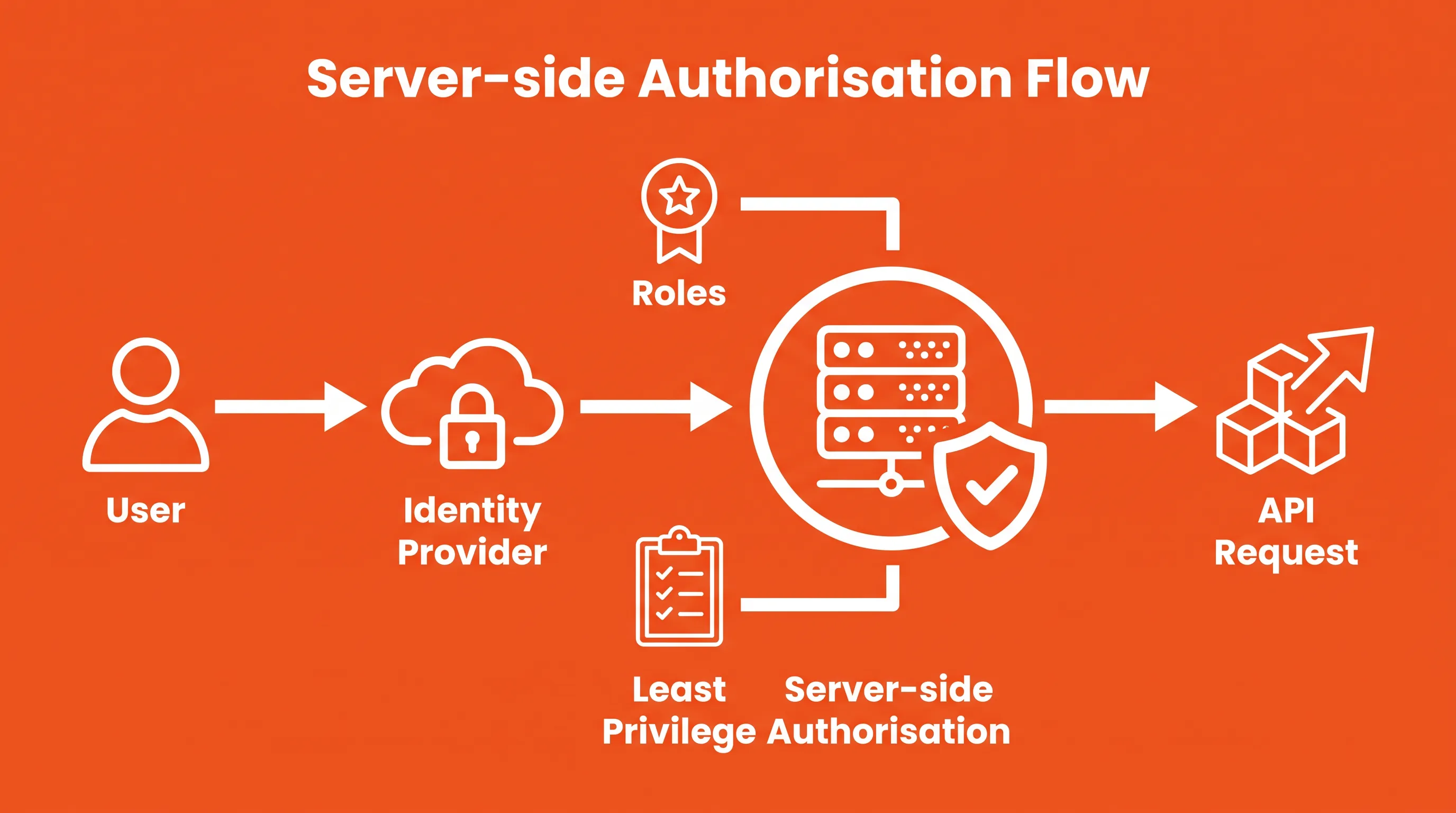
Bold infographic on bright orange background featuring white line icons illustrating user requests to a server with roles and privileges.

Once a session exists, every request that follows needs its own authentication vs authorisation decision. That decision combines what the identity provider told you about the user and the roles you assigned. The output is binary, and the default should be deny.

The rule that prevents most of the damage is simple to state and frequently ignored. Authorisation checks run on the server, on every request that touches data or triggers an action, without exception for requests that "can only" come from your own front end. Anyone can craft a request to your Application Programming Interface (API), which is why hiding a button proves nothing.

Least privilege is the second rule, and it's a design default rather than a policy document. New roles start with nothing and gain permissions when someone can explain the business need. This is where identity and access management becomes a product design concern.

Role-based access control

Role-based access control bundles permissions into named job functions so you administer groups instead of individuals. The ANSI standard defines a role as a job function within an organisation carrying particular authority and responsibility, which is exactly how the business already thinks about who does what.

The failure pattern is predictable. You create a role to cover one customer exception, and three years later you have forty overlapping roles nobody can explain. Users accumulate roles as they move between teams and never lose the old ones, so a warehouse supervisor who moved into finance holds both sets of permissions permanently.

Two requirements keep role-based access control from drifting. Cap the number of roles you'll support and review the list on a schedule, and make role assignment additive only through an explicit grant rather than inherited by accident. If your product exposes role management to customer administrators, the same discipline applies to them, because they'll build the same mess inside their own tenant.

Claims and policies

Roles in role-based access control handle the broad question of what a job function does. Claims and policies handle the narrower question of whether this particular request, on this particular record, right now, should go through. NIST describes this as evaluating attributes against a rule. The attributes are those of the subject, object, and environment.

In practice, the attributes that earn their keep in B2B software are few. Tenant identity and approval thresholds refine a role decision without multiplying roles. An approver role plus a £10,000 threshold claim replaces the four separate approver roles you'd otherwise create.

Contextual policy is where you handle risk signals. A login from an unfamiliar country or a bulk export request can trigger a step-up challenge rather than a flat denial. This keeps role-based access control readable while still responding to circumstances the role model never anticipated.

Ready to bring your ideas to life?

Book a free 30-minute discovery call with our team — we'll understand your objectives and advise how bespoke software, MVP development, or an extended team can help your business.

Multi-tenant access

In a multi-tenant product, the tenant boundary is the one that ends customer relationships when it breaks. Every database query that returns customer data must be scoped to the authenticated user's tenant at the server, derived from the session rather than from a parameter the client supplies.

The common defect is exactly that: an organisation identifier accepted from the request body instead of the session. Multi-tenant versions of this flaw are rated 8.8 to 9.5 on the CVSS scale because a single altered request returns another company's entire dataset rather than one record.

Ownership checks sit underneath tenant scoping. You need to own the invoice you're editing, so the check runs against the specific resource. Cross-tenant access exists in every platform for support purposes, and it should be an explicit and logged exception rather than an emergent property of an administrator role.

Example permission model

A permission model written in plain language before development starts is worth more than any diagram produced afterwards. Here's the shape it takes for a typical B2B platform with internal staff and customer users.

ActorData scopeAllowed actionsControls
Customer standard userOwn tenant, own recordsCreate, read, edit own recordsSession-scoped tenant, ownership check
Customer administratorOwn tenant, all recordsAll of the above, plus user management and role assignmentCannot grant roles above their own
Customer approverOwn tenant, records routed to themApprove up to a configured valueThreshold claim, second factor on approval
Internal support agentNo tenant data by defaultRead-only via time-boxed impersonationCustomer-approved, expires in 60 minutes, fully logged
Internal platform administratorConfiguration, not customer recordsManage tenants and featuresPhishing-resistant MFA, dual approval for destructive actions

Three categories deserve different treatment. Ordinary access follows the role in role-based access control. Delegated access is granted by someone with authority and carries the granter's identity in the log, and privileged access is time-boxed with a named approver.

Support impersonation is worth writing into the specification rather than leaving to convention. Make it a distinct mode that the customer can see and revoke. Record the agent's real identity alongside the impersonated account, and set an expiry that the agent can't extend without a fresh approval.

Failures and business impact

Weak separation between the two layers of authentication vs authorisation rarely announces itself. It surfaces as a support ticket from a customer who saw a record they shouldn't have, and by then the disclosure obligation has already started. Breaches involving stolen credentials take around 292 days to resolve according to IBM's 2025 figures, which is most of a year of legal cost and customer management.

The regulatory exposure is not theoretical in the UK. The Information Commissioner's Office fined Advanced Computer Software Group £3.07 million in 2025 after attackers entered through a customer account with no MFA and escalated to domain administrator. The finding was an Article 32 failure to implement appropriate technical and organisational measures, which is the clause every processor in B2B software sits under.

Orphaned privileges cause quieter damage over longer periods. A Beyond Identity study found 83% of former employees still had access to a previous employer's digital assets after leaving. Colette Wyatt, CEO of Evolved Ideas, frames the underlying discipline this way: "We believe that technology is more than just writing code. For every project, whether it's a Minimum Viable Product (MVP), bespoke software, or a new product, we strive to understand your real needs." Identity and access management requirements are part of those real needs.

Two beliefs cause most of the trouble, and both feel reasonable in a design review:

  • The endpoint behind a hidden menu item still accepts requests from anyone with a valid session.

  • A verified login establishes identity and stops there.

Audit and lifecycle controls

When something goes wrong with authentication vs authorisation, the question you'll be asked is who accessed what, when, and on whose authority. Answering it requires logs you decided to keep before the incident. Successful logins with the factor used belong in that set, as do failed attempts. Every permission change with the identity of whoever made it belongs there, as do all privileged actions.

Denials matter more than teams expect. A pattern of denied requests against another tenant's records is the earliest signal you'll get that someone is probing your boundaries, and it only exists if you record refusals as well as approvals.

Lifecycle controls are the other half. SOC 2's access criteria expect a formal joiner-mover-leaver process and periodic reviews, with CC6.3 covering access modification and removal on role change or departure. Cyber Essentials asks UK organisations for the same things in plainer language. It requires that accounts are removed or disabled when no longer required and that special privileges are withdrawn once the need ends.

Run access reviews quarterly for privileged accounts and annually for everyone else, and treat the review output as evidence rather than an internal note. Identity and access management earns its budget at audit time, when you can produce the record instead of reconstructing it. Build the export before you need it.

Discovery questions

Take this list into your next requirements session. It's short on purpose, because the answers are what generate the real specification.

  1. Who are the distinct user populations, and how many organisations will share the platform?

  2. What assurance do you need at enrolment, and does it differ for customer users and administrators?

  3. Will customers authenticate through their own SSO, and who owns account recovery when it fails?

  4. Which actions are sensitive enough to require a step-up challenge or a second approver?

  5. How many roles will you support, and who can assign them inside a customer tenant?

  6. What does support access look like, and how long does it last?

  7. Which audit obligations apply, and what evidence must you be able to produce?

The gap between a good answer and a vague one here is worth weeks of rework later, because access design is structural. Retrofitting tenant scoping into a live product means touching every query you've written.

Conclusion

Getting authentication vs authorisation right is a design decision made during discovery. For authentication vs authorisation, verify identity properly, then decide permissions separately on every request.

Evolved Ideas builds multi-tenant B2B platforms and runs discovery-led engagements where access requirements are defined before development starts. If you're specifying a new product or reviewing an existing permission model, speak to our team about your identity and access management requirements.

Ready to bring your ideas to life?

Book a free 30-minute discovery call with our team — we'll understand your objectives and advise how bespoke software, MVP development, or an extended team can help your business.

Include tests for tenant isolation and direct API requests. Authentication vs authorisation tests should also cover expired sessions and revoked accounts, plus attempts to alter an identifier in a request. Run these checks against every endpoint that reads customer data or changes a record.

Remove the previous role as part of the role-change workflow, then confirm the user's new permissions with a fresh access review. Keep the change record with the manager's approval. This prevents permissions from accumulating after a transfer and gives auditors evidence of who approved the access.

Require dual approval when one person could create a financial or security commitment without independent review. Set a value threshold or action type in the policy, and record both approvers. The second approver must have enough authority and mustn't approve their own request.

No. A customer administrator should only assign roles at or below their own authority, using a fixed permission catalogue. Restrict role creation where possible, since tenant-specific exceptions make reviews harder. If custom roles are necessary, require an approval trail and review each role on a defined schedule.

Bring a list of user groups and sensitive actions to Evolved Ideas. Also bring any customer SSO requirements. The team can use this material to discuss tenant boundaries and account recovery during discovery. Include current roles if you're reviewing an existing product.

Schedule a Discovery Call

Book a free 30-minute call that works for you

You Might Also Like

Discover more insights and articles

Over-the-shoulder view of hands typing on a laptop in a modern tech studio, with multiple screens displaying code and a coffee cup nearby.

Flutter vs React Native for B2B Mobile Apps: A Buyer’s Decision Guide

Picking a mobile framework by gut feel is how commercial trade-offs get made by accident. This guide translates the technical differences between the two leading options into terms that matter before you brief suppliers: cost, timeline risk, and talent availability. It includes a weighted scoring method you can run against your own requirements to reach a defensible decision rather than a default one.

A UK buyer evaluates app development teams in a modern workspace, featuring natural light, a premium desk, and minimalist decor.

App Developers Near Me: How UK Buyers Should Evaluate Local Fit

Picking a software partner because they're a short drive away feels safe, but proximity solves fewer problems than you might think. This guide separates what proximity genuinely improves from what it doesn't guarantee, and matches collaboration models (co-located, nearshore, extended team) to what your project actually needs.

A modern office space with an IT consultant discussing disaster recovery plans, featuring a laptop and collaborative professionals in the background.

RTO vs RPO: Setting Recovery Targets for Business-Critical Software

Every resilience conversation eventually needs to answer two questions: how long can this system be down, and how much data can you afford to lose? Here's how to turn those questions into numbers the board will actually sign off on.

A modern tech startup workspace with exposed brick, featuring diverse professionals collaborating around sleek devices and a central digital tablet.

AI Governance Framework for SMEs: Controls That Scale With Adoption

Most AI governance frameworks are built for enterprises with dedicated compliance teams. But what about lean teams that prioritise a fast pace? Here's an alternative: risk tiers to triage exposure, and a phased rollout sized for smaller organisations.